10p Mixbag - these features are #tooSuite 🤘
1. Say goodbye to PDFs on websites
Since we moved over to google sites for our school website, it has been the done thing to take policies, turn them into PDFs and then put them in a folder linked to the website with 'public' viewing rights. Easily 8 or 9 steps to get the job done.
As we've grown we've found issues with this such as multiple copies located in different places, especially when we've had to update documents following changes. It can be a real nightmare!
 So how do we solve the problem and save time? Easy, we now host all our policies in the same folder but simply make them 'view only'. No need to convert to PDF and 1 step instead of 8. The added advantage is that if we need to update any documents, we simply put them in 'suggestion mode' while we make proposed changes and the outside world can't see any of what's going on behind the scenes until suggestions are accepted and suggestion mode is turned off by the editor.
Since we moved over to google sites for our school website, it has been the done thing to take policies, turn them into PDFs and then put them in a folder linked to the website with 'public' viewing rights. Easily 8 or 9 steps to get the job done.
As we've grown we've found issues with this such as multiple copies located in different places, especially when we've had to update documents following changes. It can be a real nightmare!
 So how do we solve the problem and save time? Easy, we now host all our policies in the same folder but simply make them 'view only'. No need to convert to PDF and 1 step instead of 8. The added advantage is that if we need to update any documents, we simply put them in 'suggestion mode' while we make proposed changes and the outside world can't see any of what's going on behind the scenes until suggestions are accepted and suggestion mode is turned off by the editor.
2. Padlet Update
I've mentioned padlet previously but this post by Holly Clark highlights some new additional features including the ability to include video and also for people to vote now. Really handy! http://www.hollyclark.org/2018/01/31/5-reasons-to-use-padlet-tomorrow/
I've mentioned padlet previously but this post by Holly Clark highlights some new additional features including the ability to include video and also for people to vote now. Really handy! http://www.hollyclark.org/2018/01/31/5-reasons-to-use-padlet-tomorrow/
 3. Gapminder Eric Curts recently promoted this via is own blog and it's got huge potential for a number of subjects including Social Sciences, Economics and Business. https://www.gapminder.org/tools allows you to compare statistics between countries across the world at a glance in a visual way. Give it a try!
  4. Optical Character Recognition (OCR) Check out Tech Republic's article on OCR to save time how-to-extract-text-from-a-pdf-or-image-in-google-drive
5. Redraft with Google dictation
Got students or colleagues redrafting documents after feedback. Have you considered getting this done using the dictation tool via the microphone icon? - Just read out the document with the changes and let Google do the work for them.
Got students or colleagues redrafting documents after feedback. Have you considered getting this done using the dictation tool via the microphone icon? - Just read out the document with the changes and let Google do the work for them.
6. Cue prompter
 Preparing for presentations or speaking & listening type activities? Try the classic autocue approach using http://cueprompter.com/ and just press the down arrow to advance.
7. Facebook likes for Pages
Most people running pages are already aware but in case you've missed it, Facebook have made changes to reduce the amount of potential spam you see on your timeline. As a result, followers may miss your posts. To make sure they don't encourage them to click on "following" and select "see first"
8. Canva
On the subject of social media, give Canva a look if that's your thing. Canva allows for FREE, a team of 10 to collaborate online for documents including brochures, newsletters and social media posts.
 Preparing for presentations or speaking & listening type activities? Try the classic autocue approach using http://cueprompter.com/ and just press the down arrow to advance.
7. Facebook likes for Pages
Most people running pages are already aware but in case you've missed it, Facebook have made changes to reduce the amount of potential spam you see on your timeline. As a result, followers may miss your posts. To make sure they don't encourage them to click on "following" and select "see first"
8. Canva
On the subject of social media, give Canva a look if that's your thing. Canva allows for FREE, a team of 10 to collaborate online for documents including brochures, newsletters and social media posts.
9. Searching within a folder in Drive from G Suite
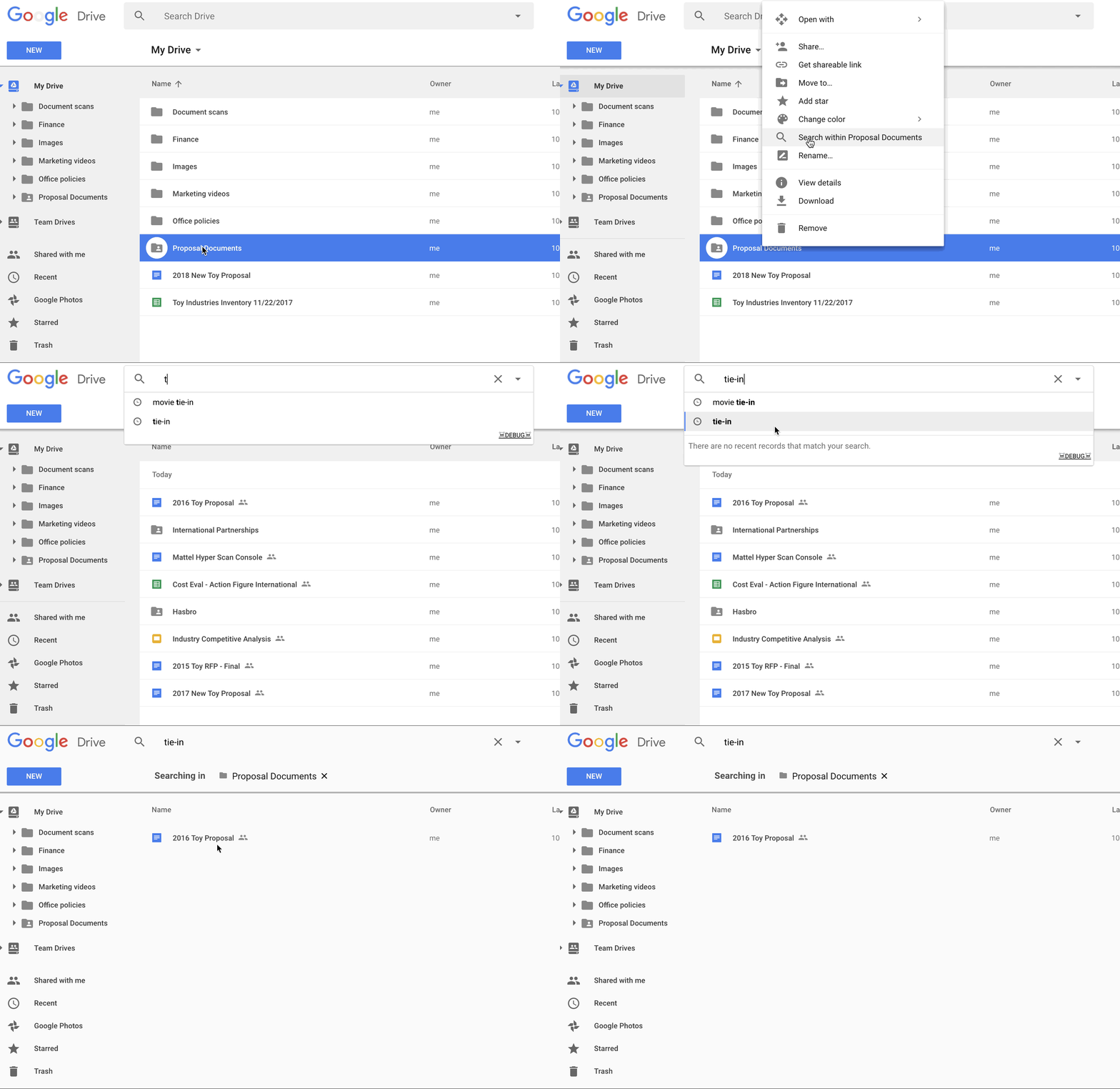
Google have made it easier to search for information within a specific folder in Google Drive. Now you can right click on a folder title in your Drive and select “Search within [title of folder].” Type terms into the search bar and track down your files faster. Here are some more tricks to help you save time searching.
And finally....
This absolute gem from Mr Aaron really made me smile 😃


