Friday, 2 August 2019

G Gems 33: Away from the day job - how G Suite helped transform a community project

Away from the day job: A story about how G Suite helped transform a community project.


Aside from being a teacher for 20 years, some of you may be aware that I'm a keen sportsman too. I've played football and cricket for many years and took up field hockey around 6 years ago, having never played before.  It's a great game and I was quick to immerse myself in the clubhouse culture just as much as on the pitch. With myself, my wife and my daughter all playing - it's like a home away from home at times and we've made great friends.

It was at the end of my first season at Witham Hockey Club that I was told about our annual Witham Beer Festival. As people explained about the event and how it was started to help raise money to maintain our clubhouse building I was impressed and excited.   I love a good ale and I was really looking forward to coming along.

That was year 3 of the festival and our volunteer organisers from the hockey club and Witham Cricket Club had done a great job of sourcing tents and marquees, a range of around 30 beers and a few wines local to East Anglia.  While some volunteers served the beer. others ran the BBQ and more played in cricket matches to entertain the visitors.  
It was really good fun, we have around 500 visitors and raised some much needed funds so I decided to get more involved in Year 4.

Year 4 I went along to my first beer festival committee meeting and it was packed.  There was a terrific range of experience and ideas but it was hard to keep everyone informed of what we were trying to achieve and where everyone was at. It was after this meeting that I spoke to our chairman and mentioned Google Drive. We'd been using it a school for around a year really effectively, thanks largely to the drive of our then Learning Technologies Manager, Dean Stokes (you might have heard of him). 

The chairman Lee and I spoke and I showed him G Suite's capabilities and a plan was formed to "Go Google".  With an 'experienced' committee we knew there would be some resistance/ scepticism but we also knew it would take the beer festival forward.

We designed a created a 'matrix' of job roles and tasks on google sheets to project manage the whole things, set up a messaging protocol so that we didn't need to rely on long-winded meetings every month and gave everyone the trust and time to get on with their jobs.

We began using google slides and drawings to create advertising posts for social media, we used sites to redevelop the website and docs to create our programme. We kept all our documentation in Drive, with access to those who needed it and did away with reams of paper. We also used forms for volunteer sign up and feedback on the festival.

Overall, the first year was challenging but the committee embraced the new methods (with a bit of training and support from yours truly) and we are now heading towards our 9th festival from 22-22 August 2019.

Things grew rapidly, even the marquee! (2013 -2017)

The festival has grown massively in popularity and size since those days and it would not have been possible without using G Suite and the support of our partners, especially Paul from Harwich Town Brewing Company. We now welcome over 2000 visitors to the event, have a range over over 100 beers, ciders and wines, have live cricket and music as well as professional caterers. This year, using Glide and google sheets, we'll also have our own App 

It has become one of the most popular community events in town, supported greatly by sponsorship of barrels by local businesses and people.

If you're in Essex over August Bank Holiday, why not pop in for a pint?


Wednesday, 13 March 2019

G Gems 32: If you're Appy and you know it...

If like so many people,  you'd love to be able to set up your own app but don't have a clue where to start Glide might be right up your street.

Glide works with google sheets to help you create FREE apps within minutes.

This could be used for all manner of purposes including:


  • PE Club Timetables
  • Revision Session Timetables
  • Holiday/Weekend Session Timetables
  • Subject Apps with links to key resources
  • Directories
  • List of students and staff for trips
  • many more uses
Here's a very basic screenshot of the sheet I used to test this out.  
I've included the type of social media platform and the link to them in separate columns. This is the result.


Pretty simple to do.


Here is how it appears in the app - I chose the dark mode setting but light is also available.


Click here to go to the live app


In your dashboard it's really easy to control and you can update your google sheet via the dashboard or in sheets itself.


Why not give it a try? You can be up and running in minutes!

Monday, 4 March 2019

G Gems 31: Just a quickie

It's been quite a while since I've had time to sit down and write a blog. There's been a lot going on in my real world of work and family so it's been hard to take the time to do anything lengthier than a quick twitter or Facebook post.

GMAIL updated

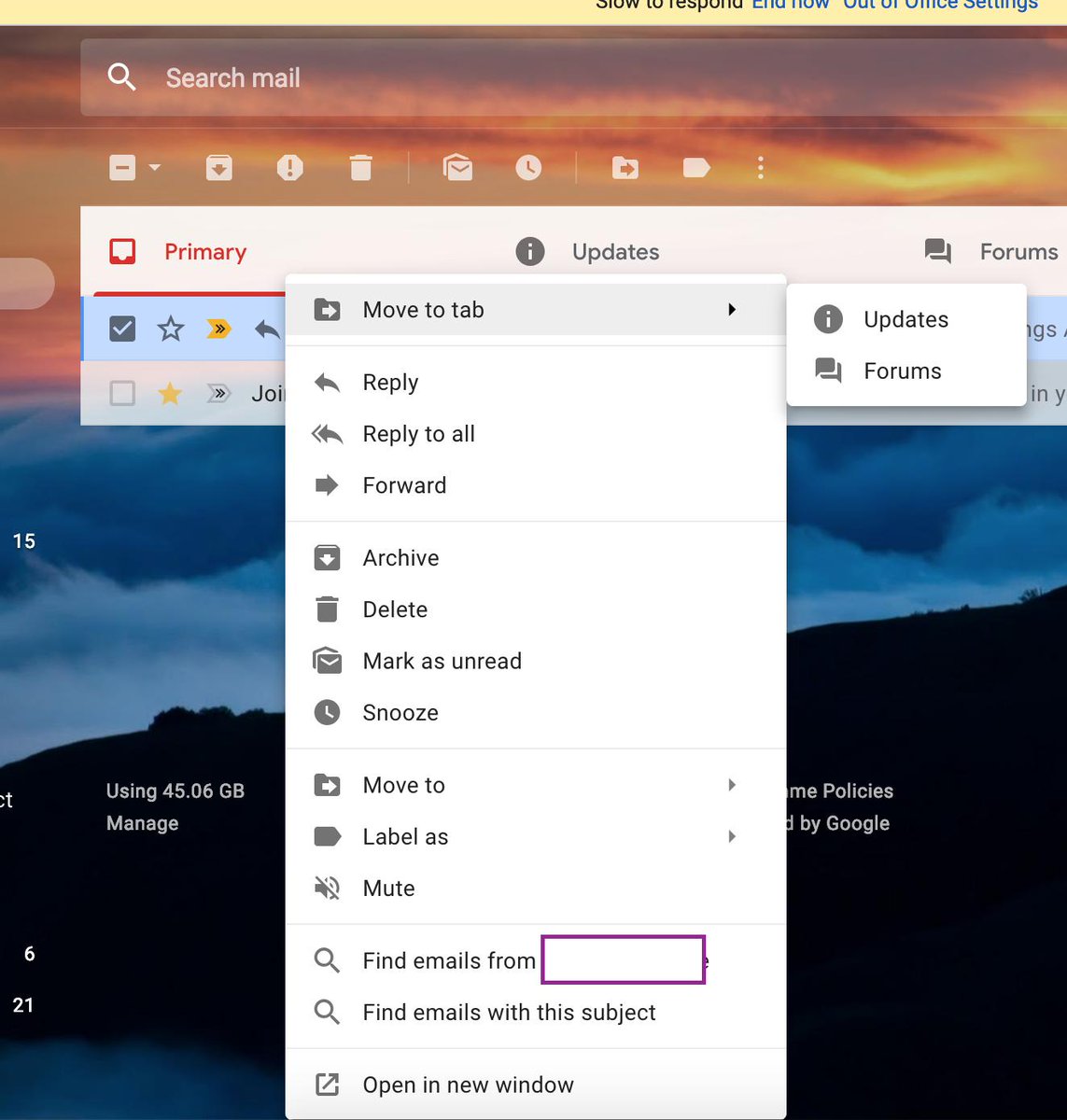
ImageOverall I'm liking the new update to gmail app but the very white interface has certainly divided opinions. One thing I really like now is the right click option on an email that allows you to use the "find emails from" and "find emails with this subject" feature.


This has already proved very useful and has sped up my workflow.


Embed videos into Google Drawings

If you want to embed videos into Google Drawings, here's how to do that in this much under utilised tool by using google slides first.


Google Sheets for Education Support Staff
As I work very closely with a team of educational support staff, I'm always on the lookout for ways to make their lives easier in G Suite.  I've put together a Youtube playlist of google sheet videos and gifs that my team have found useful which you can view here: Google Sheets Playlist

The list includes topics like using sparklines, combining data from 2 cells into 1, conditional formatting based on contents of other cells and more...

If you or your school is interested in some bootcamp style training specific for Educational Support Staff, why not contact @Appsevents1 and see what can be arranged? 

If you are a member of Educational Support Staff, join my Facebook group too or follow the hashtag #googleESS for updates, tips and tricks. 

Thanks for reading, stay tuned for more.


Sunday, 2 December 2018

G Gems 30: It's beginning to look a lot like Christmas...


It's beginning to look a lot like Christmas...

πŸŽ„πŸŽ„πŸŽ„πŸŽ„πŸŽ„πŸŽ„πŸŽ„πŸŽ„πŸŽ„πŸŽ„πŸŽ„

It's December 2nd and this is the first chance I've had since half-term to sit a write anything on here.  The Autumn term, as always, is a long and busy one but Christmas is homing into view and it won't be long until the days start getting longer again!

I'm very fortunate to have just returned from Vienna, having led a Support Staff Bootcamp and the Vienna International School for @Appsevents.  It was my first time in Austria for 30 years and what a beautiful city Vienna is: clean, friendly and calm. Although I flew in late on the Thursday night and flew out again late Friday night, after a very intensive full day of training with the excellent staff at the International school, it was great to be able to fit an an hour or two at the Weihnachtsmarkt in Marksplatz. One 
of the school staff, Jeremy, offered to show me around and I was able to take in some sights, buy a couple of hand crafted gifts for the family and enjoy a warming mug of GlΓΌhwein in the fresh Vienna air (-4 degrees having left London at 13 degrees). 


I really enjoy the Support Staff Bootcamps for 2 reasons: The first is that I can guarantee within any group (this week there were 19) there will be a range of ability within G Suite but that everyone is a mini-expert at something.  It may be one tiny aspect of one of the G Suite products, but from tiny acorns..... The second reason is that quite often, schools adopt G Suite for Teaching and Learning purposes and the support staff kind of have it thrust upon them. This can be daunting and occasionally resented...but once we dive into what G Suite can do, everyone comes away with some positives and beginning to think about the possibilities. 

So I'd like to thank all the staff at Vienna International School for their positivity and hospitality during my visit. Well done to the 24 teaching staff who gained their Level 1 educator certification with @BogdanCopil who ran their 2 day bootcamp alongside and thanks again to @Appsevents for the opportunity and my schools for allowing me the time. 


Here are just a few tips and tricks you might like to try:

1.  Housing documents in multiple team drives

One of my favourite aspects of Drive is the ability to use the SHIFT + Z trick to add documents to multiple folders, meaning 1 version exists in many places but everyone has access to the same live version, no copies. 
Due to the nature of Team Drives, this isn't an obvious option, in fact, many think it's not possible - but it is! 


2. Qlearly - organise your tab windows for different purposes

This new kid on the block is a handy way to organise your tabs for different purposes - it comes with a template of ideas which you can edit as you see fit.  Have a board set up with sections for each class, or each role and save the commonly used sites for that purpose in each to open quickly and easily at the touch of a single button. 


3. Mac users - upgrade to Mojave

The latest version of ios for macs allows screen recording and screen shooting with annotation as standard using CMD + SHIFT + 5


And finally

My students current favourite thing in feedback...

Using Google Keep to provide animated GIF feedback in slides and docs.

Save your favourite GIFS to keep and in slides or docs, just pull those gifs into the docs to give students engaging feedback.
I've noticed increased improvement rates in student work as they're keen to see what the next GIF will be.