Showing posts with label appsevents. Show all posts

Friday, 15 November 2019

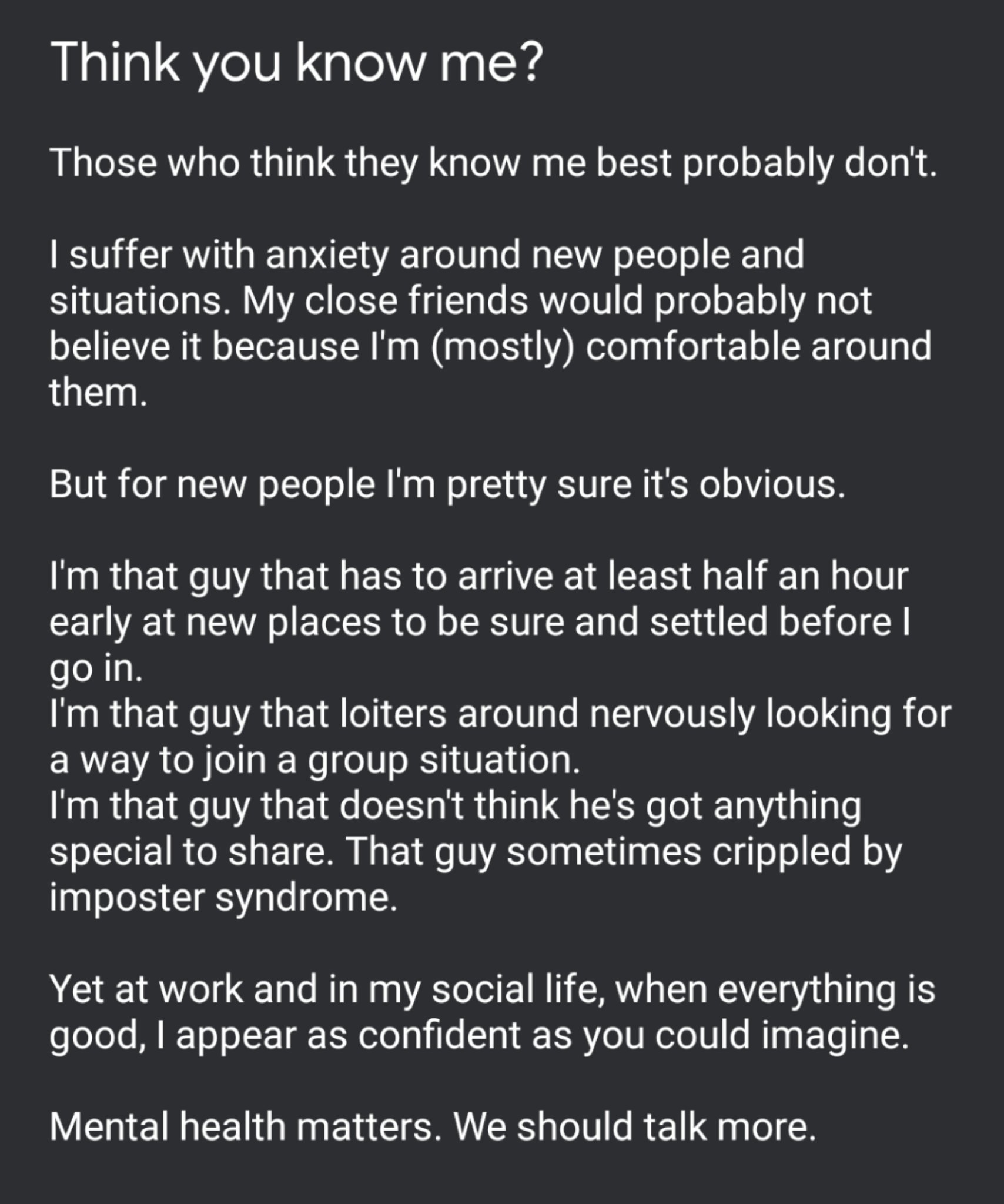
Think you know me? I've only recently got to know myself!

Image
tweeted Nov 11 @Rangathetrainer


Several days ago, possibly after following #SWE19 and the fun, games, innovations and emotions being shared by those taking part, I felt compelled to share the tweet on the right here.

I'm not normally one to share, I'm quite a closed book and have long upheld the typically british stiff upper lip approach to life: no matter how bad things are, turn up and soldier on with a smile. How often has that smile been painted on? I daren't even imagine!

It felt like a great relief to open up about my anxiety and I was touched by some very honest and appreciated conversations both in person and online with people I respect highly. 

I am that guy that get anxious about new situations. 
I take a while to warm up in new company.
I hover around nervously looking for a way in.
I am the guy that is constantly looking for reassurance. I want to feel like I belong.


It was this tweet from Miss C (@Tech_missc) that finally prompted me to open up: I need this space


As I wrote in my tweet, those closest to me probably don't see this side of me because with them, I am more at ease and usually sarcastic, quick-witted and sharp. But this is only because I feel I belong.

Throughout my professional life I have always strived to help others. I've never felt like I am brilliant or amazing, I just do what I think needs doing to the best of my ability. I find taking compliments very uncomfortable and tend to crack a joke to laugh it off or diminish my involvement to deflect the attention. 

It has only been in the last 2 years that I have begun to understand this. I made a bold decision 3 years ago and made a big career change. It was something I'd always felt I wanted to do. I was SO wrong! I quickly learnt that it wasn't what I wanted at all and I found my way back to a more suitable role as quickly as I could, as much for the benefit of others and for my own sanity and health. I was in the wrong position for me. It wasn't right or fair on me or others.

Walking away felt like a failure and it still haunts me from time to time, even though I try to remind myself that it was an equally bold decision to do so. I took a risk, it didn't work so I made changes and as a result, I've learnt a lot.

_________________________________________________________________________________

Part of my 'recovery' from this failure was down to a guy who I owe a huge amount. His name? Dean Stokes. (@deanstokes). 
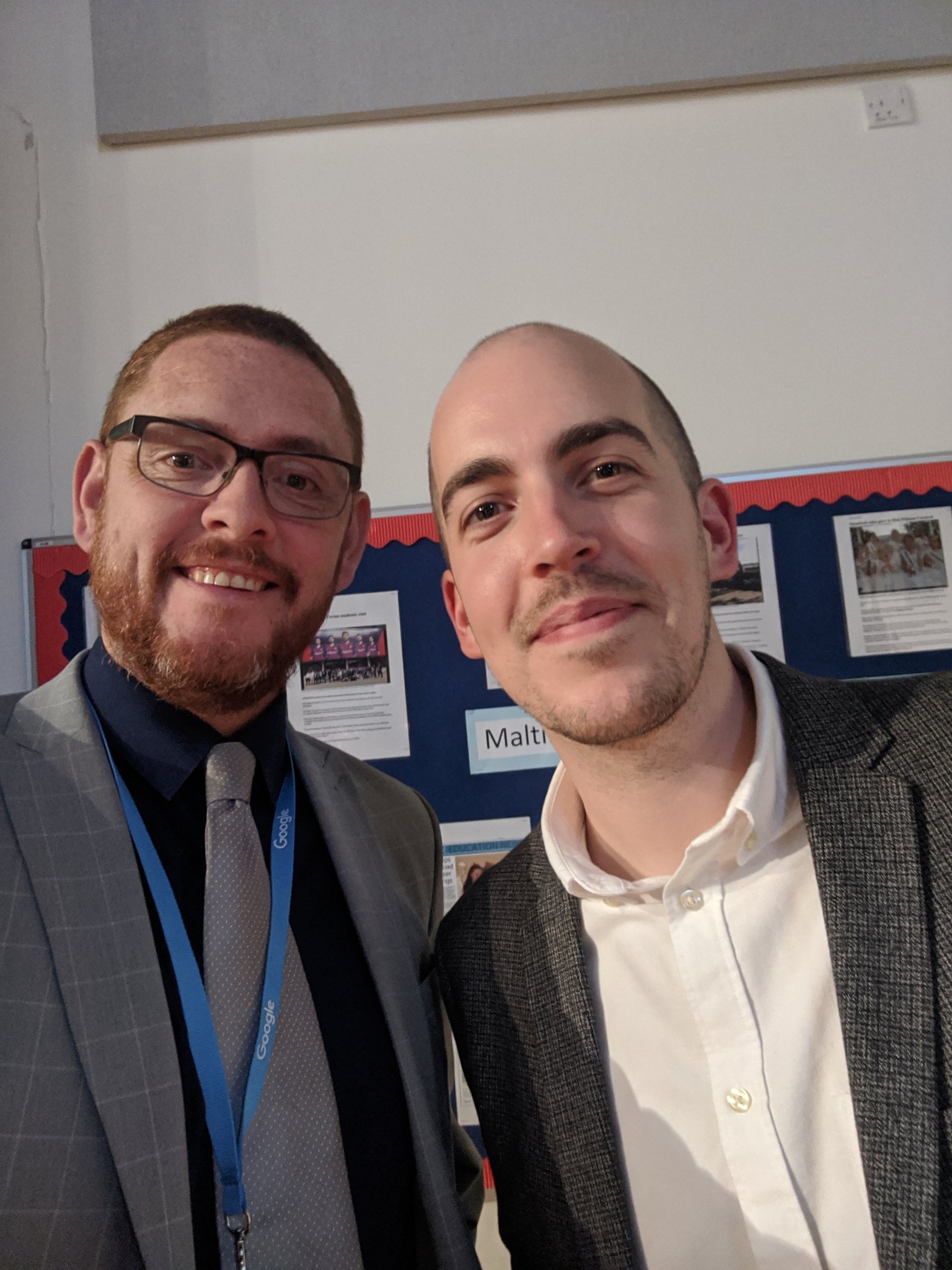
ImageI've known Dean for 20 years now, ever since he was a pupil in my very first Year 7 class in my NQT year. By his own admission, Dean was a shy young man in those days and somehow, he ended up growing in confidence and starring in school productions. He later returned to the school as a member of staff, a bit of a gamble of his own, and was instrumental in introducing G Suite to our school.

I had the honour of sharing an office with Dean for some time and learnt a huge amount about not just G Suite, but also, how to diversify and put yourself out there. When Dean moved on from school to full-time work, first with Appsevents, guess who took up the G Suite mantle.

I didn't feel ready. I didn't feel I had the knowledge base that Dean had. I felt I was dabbling and would quickly be found out. The one thing I was sure of though, I couldn't break it!

So fast forward to September 2018 and I got a call from Dean asking me to deliver a G Suite Support Staff Bootcamp for Appsevents in Aberdeen. I was hugely flattered but at the same time wondering, how desperate are you, Dean? You're asking me! 

I felt out of my depth and worried/anxious that I wouldn't be up to it. Getting a plane to Scotland was my first ever internal flight. I didn't even know what I needed but knowing Dean would be there to meet me at the airport got me through. At the hotel we met up with Ben Rouse (@Mr_BRouse) and talked about the plans for the next day. Then it was early to bed ahead of a busy day. I didn't really sleep. I kept tweaking my slides and pacing. Restless legs kept me awake.

The next morning we found our way to the venue and I had a great time with the staff there, who were welcoming and very receptive. I really enjoyed it but I still had doubts: Was it ok? Did they get what they needed from it? Did I miss anything? All these questions flying around my head.

Not long after Ben asked me to lead a similar bootcamp in Vienna. That was huge for me. And, as you might predict, I got to the school early, too early, no-one was there so I walked around Vienna for over an hour making sure I didn't stray too far and would be there on the dot to meet my contact. This was another great day and finished off with one of the delegates Jeremy, taking me to the Christmas Markets for some Gluhwein. A lovely way to end the day.

But all through this and still to this day, I don't feel like an expert, even though colleagues try to tell me I am. I just don't see what I do as anything special, because it's just what I've learnt to do.

So how does this all link?

Last night our school held our annual Key Stage 4 Awards Evening and I had invited Dean to be our guest speaker. We had several long chats beforehand and I was amazed to find he often feels like I do.
We talked about the message he could share and how that would be relevant to the students. He couldn't see it. That got us talking about Imposter Syndrome (which ended up a key part of Dean's message on the night). 

Needless to say, Dean smashed his speech. Everyone loved it. My technical side went well and the evening was a great success. A superb final school memory for our students and a great message for the future.


  • You’re more likely to regret the things you didn’t do rather than the things you did.
  • Take risks, make mistakes and learn from everything you do.
and remember
  • If you're feeling like a fraud, that's probably because you are really challenging yourself.
So to everyone reading this, thank you. Thank you for reading, thank you for reaching out, thank you for sharing - not just with me but with fellow professionals, friends and family.

And above all, thanks to you Dean. I would not be doing what I do now if it weren't for that quiet, shy guy who sat in French and allowed me to call him "Wally". 

The best kind of friendship is one where both of you grow as a result of the other.

Monday, 4 March 2019

G Gems 31: Just a quickie

It's been quite a while since I've had time to sit down and write a blog. There's been a lot going on in my real world of work and family so it's been hard to take the time to do anything lengthier than a quick twitter or Facebook post.

GMAIL updated

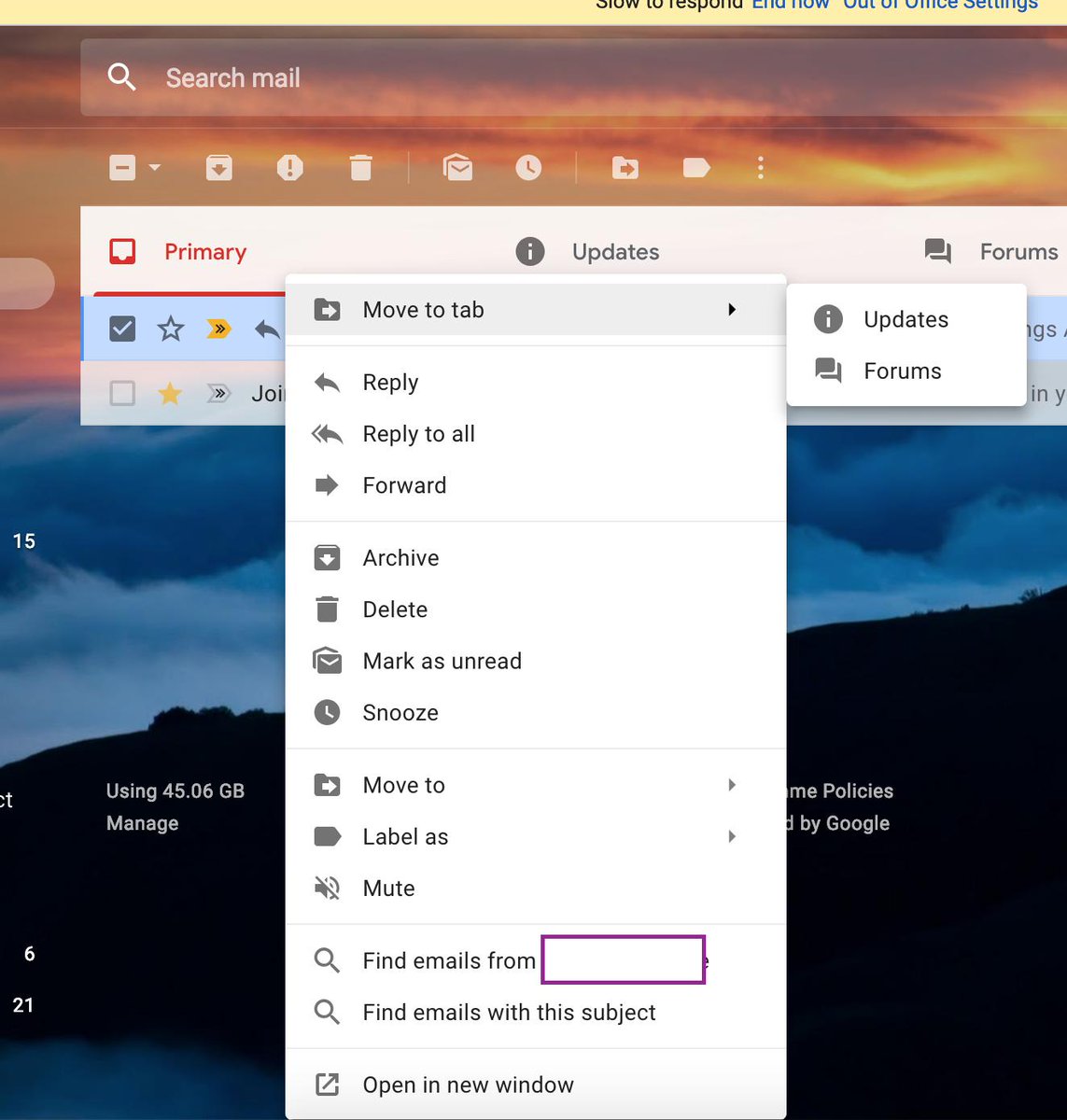
ImageOverall I'm liking the new update to gmail app but the very white interface has certainly divided opinions. One thing I really like now is the right click option on an email that allows you to use the "find emails from" and "find emails with this subject" feature.


This has already proved very useful and has sped up my workflow.


Embed videos into Google Drawings

If you want to embed videos into Google Drawings, here's how to do that in this much under utilised tool by using google slides first.


Google Sheets for Education Support Staff
As I work very closely with a team of educational support staff, I'm always on the lookout for ways to make their lives easier in G Suite.  I've put together a Youtube playlist of google sheet videos and gifs that my team have found useful which you can view here: Google Sheets Playlist

The list includes topics like using sparklines, combining data from 2 cells into 1, conditional formatting based on contents of other cells and more...

If you or your school is interested in some bootcamp style training specific for Educational Support Staff, why not contact @Appsevents1 and see what can be arranged? 

If you are a member of Educational Support Staff, join my Facebook group too or follow the hashtag #googleESS for updates, tips and tricks. 

Thanks for reading, stay tuned for more.


Sunday, 2 December 2018

G Gems 30: It's beginning to look a lot like Christmas...


It's beginning to look a lot like Christmas...

πŸŽ„πŸŽ„πŸŽ„πŸŽ„πŸŽ„πŸŽ„πŸŽ„πŸŽ„πŸŽ„πŸŽ„πŸŽ„

It's December 2nd and this is the first chance I've had since half-term to sit a write anything on here.  The Autumn term, as always, is a long and busy one but Christmas is homing into view and it won't be long until the days start getting longer again!

I'm very fortunate to have just returned from Vienna, having led a Support Staff Bootcamp and the Vienna International School for @Appsevents.  It was my first time in Austria for 30 years and what a beautiful city Vienna is: clean, friendly and calm. Although I flew in late on the Thursday night and flew out again late Friday night, after a very intensive full day of training with the excellent staff at the International school, it was great to be able to fit an an hour or two at the Weihnachtsmarkt in Marksplatz. One 
of the school staff, Jeremy, offered to show me around and I was able to take in some sights, buy a couple of hand crafted gifts for the family and enjoy a warming mug of GlΓΌhwein in the fresh Vienna air (-4 degrees having left London at 13 degrees). 


I really enjoy the Support Staff Bootcamps for 2 reasons: The first is that I can guarantee within any group (this week there were 19) there will be a range of ability within G Suite but that everyone is a mini-expert at something.  It may be one tiny aspect of one of the G Suite products, but from tiny acorns..... The second reason is that quite often, schools adopt G Suite for Teaching and Learning purposes and the support staff kind of have it thrust upon them. This can be daunting and occasionally resented...but once we dive into what G Suite can do, everyone comes away with some positives and beginning to think about the possibilities. 

So I'd like to thank all the staff at Vienna International School for their positivity and hospitality during my visit. Well done to the 24 teaching staff who gained their Level 1 educator certification with @BogdanCopil who ran their 2 day bootcamp alongside and thanks again to @Appsevents for the opportunity and my schools for allowing me the time. 


Here are just a few tips and tricks you might like to try:

1.  Housing documents in multiple team drives

One of my favourite aspects of Drive is the ability to use the SHIFT + Z trick to add documents to multiple folders, meaning 1 version exists in many places but everyone has access to the same live version, no copies. 
Due to the nature of Team Drives, this isn't an obvious option, in fact, many think it's not possible - but it is! 


2. Qlearly - organise your tab windows for different purposes

This new kid on the block is a handy way to organise your tabs for different purposes - it comes with a template of ideas which you can edit as you see fit.  Have a board set up with sections for each class, or each role and save the commonly used sites for that purpose in each to open quickly and easily at the touch of a single button. 


3. Mac users - upgrade to Mojave

The latest version of ios for macs allows screen recording and screen shooting with annotation as standard using CMD + SHIFT + 5


And finally

My students current favourite thing in feedback...

Using Google Keep to provide animated GIF feedback in slides and docs.

Save your favourite GIFS to keep and in slides or docs, just pull those gifs into the docs to give students engaging feedback.
I've noticed increased improvement rates in student work as they're keen to see what the next GIF will be.


Tuesday, 23 October 2018

G Gems 29: Half-term tricks and treats πŸŽƒπŸŽƒπŸŽƒ

Half-term tricks and treats πŸŽƒπŸŽƒπŸŽƒ

It's been a crazy half-term with back to back Open Evenings, parent consultations, running an ESS Bootcamp in Aberdeen with Appsevents and leading lots of staff CPD as we've started to roll out Lenovo E500 Flip Chromebooks to staff at my schools. 

I've got to say I love mine, it light, works as a tablet, has a garaged stylus that is very responsive and the key thing for me, I charge it every 3 days, not every 30 minutes like I did with my old laptop.

The ability to use apps like Squidnotes and Jamboard on my chromebook has been a godsend for me as a MFL specialist, eliminating the clunkiness of adding special characters when writing on screen. Now I just get on with it which keeps the pace high but also, I believe, develops students' comprehension skills as they have to read handwriting rather than typed fonts. 

As colleagues have come to me with questions, it's been great fun trying to find resolutions to issues and it's a work in progress at this stage.  We're still looking at the best way to use Smart Notebook on our chromebooks as many staff, especially in maths and science, have a large bank of lessons they want to keep using. 

Here are just a few tricks, treats and new features that I'm loving at the moment:

Tabcloud is a great little extension that enables you to build specific tab set up for different purposes.  I use it to create a tab cloud for each class. Each 'cloud' is customisable and when opened, will bring up all the tabs you're going to need at once in a new window. As you will see from the screenshot you can preload any number of sites including classrooms, drive, website etc. 


Keep Awake extension is a great extension for chromebooks when using in class or for presenting.  It does what it says on the tin, preventing your chromebook from going to sleep when in 🌞mode and allowing sleep in πŸŒ”mode. Get the extension here

Jamboard has come to web as well as devices now and the two make a great team. Projecting from a desktop on screen in class and then roaming the room with the Jamboard app on my chromebook, I can allow students to contribute and control what's on screen.  Great for redrafting, peer assessment and organisational thinking. Jamboard has some amazing features. 

Check out my video intro
 to Jamboard here 


CC - Closed Captions in Slides
is another terrific addition to Google Slides, enabling presenters to speak and have subtitles display almost immediately. Ok, so it's not 100% perfect yet but if you speak clearly it's pretty darn accurate. Great for presenting to groups who may have hearing difficulties and also for video recordings using Screencastify. This enable you to limit your slides to minimal information (as we all should) and then talk through the key points. 

Just go to present and click the CC button in the control bar that appears at the bottom.

Mentimeter.com is another great tool for gathering quick information. Post a poll or question, display a code and get your audience to vote from their devices.  You and they will see results appear in real time. Here's an example of what your audience would see. 


Saturday, 22 September 2018

G Gems 28: What a difference a year makes! Let's head to Bootcamp.

So just a year ago I attended the Google for Education Back to School Summit in London which was being hosted by my good friend and former colleague/student Dean Stokes for Appsevents. This was my first visit to Google and quite an eye opener as we played around with Jamboards and sat on inflatable pink flamingos for a coffee and a chat. It was a very inspiring day and prompted me to get more involved. 

Within a month, a October half-term 2017 I set aside a day to complete my Certified Educator Level 1 exam and passed, so did Level 2 the following day. I passed again and was feeling really pleased with myself. 
Fast forward to January and I was asked to lead some Google training, not for teaching staff but for Educational Support Staff in my schools. As the unsung heroes and the glue that keeps schools together, I wanted to make sure I got the right notes and the team came away with something to actually use in their every day work lives. The feedback was positive: Mission Accomplished. 

In July I was asked to run some CPD for a local primary school with teachers and but for a few WiFi issues, that went well too. At the same time I was constantly chatting withy wife, who is a Finance Assistant in a secondary school, about her workload and balance. I've tried to get her using more G Suite but it's a but to be fair, when she gets home she wants to relax, not launch into training mode, even though we both know I can help: Work in progress.

At the end of July 2018 I completed my Certified Trainer application and was successful so set about planning my 12 sessions for the year. With day 1 of the Autumn term in the calendar already for LSAs I devised and ran a short digital escape room designed to raise their awareness of Google Forms and Classroom. That went well too so I offered to run a term long in house CPD pathway on G Suite for staff which begins next week. It begins next week as the original date has to be postponed following a text from Dean Stokes asking if I could make it to Scotland this weekend to help out with an Appsevents bootcamp for Support Staff. I got the nod from my bosses and booked my flights and hotel.
My first day delivering a bootcamp - Robert Gordon's College, Aberdeen

Yesterday was that day as I delivered my first full day Support Staff Bootcamp at Robert Gordon's College in Aberdeen. What an amazing building to work in on my first visit north of the border!
After a hearty breakfast in the hotel, including haggis and tattie scones, Dean, Ben Rouse and I headed off to set up.

The group of 6 support staff I was working with were all in different roles and confessed to different levels of confidence and frustration but they were awesome and very positive throughout. (Always appreciated on your first one, so thanks folks!)

We had a packed day and it was awesome to see faces light up and "You mean, I can just do that...?" flying around the room.

As I explained to the group, my view is that support staff in schools using G Suite often get the tools thrust upon them because it's been brought in for teaching and learning. Often they are self taught and know what they know, which can be limited so it was great to dive deeper into Drive, Docs, Sheets, Forms, Slide, Sites and more with them. When the day finished everyone was really appreciative and full of ideas so I'm happy.

This massive part of the educational work force is often massively under appreciated and that's why I've created a Facebook group for Support Staff using G Suite.

If you have support staff in your school that would like to see hints, tips and share best practice, please invite them to join.

Also look out for #googleESS on social media 


Sharing is important but more importantly in this day and age, G Suite can change your world.
As I said to Ben and some of the group afterwards, I'm not selling anything except a better work-life balance. What's not to like? 

Thanks to Dean, Ben, Appsevents, everyone who took part in the day and also my schools for allowing me the time! 


Saturday, 17 March 2018

G Suite Gems 20: getting better and better


In a week where I've seen people yet again encouraging people to move away from Google because of "security" alongside the standard "I've been trying for ages but I just can't get on with google" my sense of humour has had a real test! 

Dispel the myths and read for yourself here Google For Education and GDPR and here Privacy & Security 

So with that cleared up, let's embrace the world of G Suite and see what's new:

Slides - users with portable IOS devices will now find they have a draw option when presenting a slide deck on screen. This means you (or your students) can now write directly on a slide to annotate, comment or highlight key areas. This could be a real game changer for many in the classroom, especially maths, science and MFL teachers where you can now free write symbols, equations and special characters without needing to insert. 

New Google Sites - a welcome update: users of new google sites can now upload their own favicon (that's the little guy who appears in a browser tab or in your bookmark bar). This can help your site visitors more easily recognise your site, and help you build your brand.

Upload a favicon 

Google Docs Menu update - one of the things I love about G Suite is how things are constantly changing and that's down to the feedback submitted AND the fact that Google actually listen to it. 

I'm loving the update to Docs menu that has separated out text and highlight into their own boxes. I've lost count of the number of times I've highlighted when I meant to change font colour or vice versa but no more! 

Google Drive searching - searching in Drive is so simple but I know many people still spend ages scrolling through trying to find a file rather than heading straight to it. The update to drive to allow you to see the 4 most recent files as Quick Access was an excellent addition and now comes another: 


The “Shared with Me” section shows the files that have been shared with you by another owner (searching by owner is a great way to find docs by the way) but the lovely people at Google are going to start organising this section for you so you may also see people listed, along with files they’ve shared with you. Simply click on a document to quickly open it. 

Check out google's blogspot here
And finally... it's now less that a week to the @Appsevents Google Summit in Wembley. I'll be heading along for day 3 and looking forward to catching up with friends but I'm also really pleased to see support staff bootcamps running on the Friday. In my opinion, a school's support staff are key to getting the whole organisation to embrace collaboration through GforE. When these unsung heroes understand how they can work more efficiently within their own teams and beyond,  and champion this, the rest of the staff will have to get on board. 

If you're a member of school support staff, get along to one of these bootcamps and save yourselves a whole heap of work in the long run.


Tuesday, 30 January 2018

G Suite Gems 13: I can't believe it's not BETTer!

I can't believe it's not BETTer! 

So last Friday I was fortunate, after 3 years of trying, to get the chance to attend the Bett show 2018. To be honest I didn't really know what to expect having only ever visiting Excel once before for the Motor Show.

On arrival, as a newbie, I must admit to feeling a little intimidated and overwhelmed. Aside from getting zapped at the entrance and given a lanyard, very little information was shared so in I walked with trepidation to a maze of stands.

Now don't get me wrong, some of what I saw was great. I really enjoyed listening to a keynote speech by Bram Bout, Director of Google for Education, talking with others about the soft skills employers are looking for these days: problem solving and collaborative skills topping the list. Take note careers advisors and teachers, #curiosity is key!

Dean is a former teacher/Leader of Learning Technologies
 in 2 secondary academies
I had a great time catching with my pal and former colleague Dean Stokes, who is UK Director of the excellent Appsevents.com - I'm always eager to see what Dean and his colleagues Ben Rouse and Oli Trussell have to share and am never surprised to see their stand packed out. When I got there Dean was in the middle of a demo on using Google Classroom and Quizzes alongside Science Journal with a group of around 30 keen-faced individuals. Talking to Dean afterwards, that was their 55th demo of the week (and counting).

No matter how much I think I know, these guys always manage to hit me with something new and nothing is too much trouble. It was through talking to Ben that I came across Squidnotes.com as a note taking app that has tremendous potential for maths and MFL teachers particularly as it could remove the annoyance of inserting special characters and accents.

As I continued round the massive space, weaving in and out of what seemed like endless rows of Interactive Whiteboards and fad robots, it struck me that when you sift through all that, actually, there wasn't much individuality. In fact, some of what was on display seemed almost dated already. This surprised me but perhaps it shouldn't have. Is it just that those of using #Edtech somehow take it for granted and don't appreciate what we have?

After a Costa with the GEG Uk group - thanks to Andy Cooper for arranging and Andrew Caffrey for buying - it was off to a talk about how Google fits within the new GDPR and then to look at some Chrome Flipbooks with Active pen and IT solutions for School-wide notifications.

So here are the things that stood out for me from Bett 2018:

  • Appsevents.com for G Suite training needs. These people really know their stuff and how to engage an audience 
  • Equatio, a maths extension from the Texthelp team which is FREE for teachers 
  • Use the Explore option in Google Sheets to make people think you're a formula
    wizard. Ask the question in word form and then "discover the formula" and use it. You can also use Explore to link from docs/slides to other docs without disrupting your workflow - Check out @gsuite’s Tweet: G Suite Tip 
  • If you're looking for an IT system to send school-wide notifications, check out www.netsupportsoftware.com who offer a 30 day free trial for up to 50 PCS/laptops 


So there you go, my first BETT impressions - underwhelmed by much, inspired by some but worth it?   Probably.


Saturday, 16 December 2017

G Suite Gem 6


πŸŽ„πŸŽ„πŸŽ„πŸŽ„πŸŽ„Who's ready for a Christmas Party ?πŸŽ„πŸŽ„πŸŽ„πŸŽ„πŸŽ„

Let's start at the Office.

Be Awesome this Christmas and use Office Documents in Drive!

I work with a number of people who are very used to and comfortable with Microsoft Office and have a large number of historic files that they want to keep using without converting them to Google Docs, sheets or slides. This is often due to concerns that some formatting might be affected.

These guys were very grateful to hear about Awesome Drive from aodocs.com and have gone away to give it a try. Essentially, this clever extension allows you to create, edit and save Office files within Google Drive. Great hey? 

Here's a short video from EdTech Tutorials to show you how it works. Enjoy! 


Teach yourself about Script Editor

Prior to visiting the Appsevents Google Summit for Education in October, I had never written any sort of code or script. As I swapped workshop midway (which was encouraged) I was fortunate to find the excellent Oli Trussell just finishing up with instructions and letting everyone try appscripting for themselves. Massive Faux pas on my part! However, just a short conversation with Oli and a further look at the resources from the day in my own time got me interested. 
That was October.  

Fast forward to December and I've finally found some time to do some research and have successfully written a code to embed Twitter into one of my Google Sites (only to find the feature was added anyway 2 days later 🀣🀣🀣) and also learnt to code a pop up message to show on opening a document using HTML and Script Editor. Check out https://www.w3schools.com/ and click on the try it yourself to learn for yourself. 

Attaching emails in Gmail 

A friend of mine uses Gmail at work but has been frustrated an when he used Outlook he could always attach an email another email for referencing or providing context. He asked me to see if it could be done in Gmail and the answer is YES!. 

Follow the steps here to attach an email to another email message in Gmail or 

The great news for me is that it also work with Inbox for Gmail, which personally, I LπŸ’™VE. (Another thanks due to Oli T for introducing me to this extension - I've never had such an organised and empty inbox!) 

Sunday, 10 December 2017

G Suite Gems πŸŽ„πŸŽ„πŸŽ„ Special 10 Dec 2017: A little off piste at Le Mountain View Winter Gathering


G Suite Gems πŸŽ„πŸŽ„πŸŽ„ Special: A little off piste at Le Mountain View Winter Gathering

It's snowing and I'm sitting with a cup of soup, reflecting on a great afternoon/evening at +Google London HQ this past Friday where Google for Education hosted their end of year Winter Gathering for partners, reference schools, educators and trainers.

I love events like this as you not only get to meet some great people and make superb connections, but you also get to let your creativity flow. Something that can be hard to do in your standard office or school environment.

So in between games of shuffleboard, the photobot.co Ski lift gif booth and some VR skiing I was able to chat with lots of new faces and some old friends about all things G Suite. I also got to witness 6 great demoslams.

Not only is it great to find out about upcoming features (sorry, no spoilers here) or find new ways of using existing features but I also had the chance to offer some feedback on current features which would make things even better.

Sometimes, it's easy to lose sight of the fact that some of the systems we use on a daily basis might be groundbreaking to someone else, just because we are used to them. I'm really looking forward to sharing our experiences with colleagues and new contacts in the coming year.

Many thanks to all at Google for this great event and especially to Dean, Ben, Oli & Dan from Appsevents for inviting me along. 

Maybe starting the weekend on a ski lift was an omen? Le Mountain View Turtle neck is certainly going to get more use than expected this week!

And finally....

It wouldn't be right to go without sharing something so don't forget to track Father Christmas - you can even play some games and learn to code while you're there!! In the spirit of the event....

SLAM!

Here's to a great Christmas and a great 2018. Things just get better and better. πŸŽ„πŸŽ„πŸŽ„πŸŽ„πŸŽ„πŸŽ„πŸŽ„πŸŽ„πŸŽ„