Showing posts with label googleESS. Show all posts

Friday, 15 November 2019

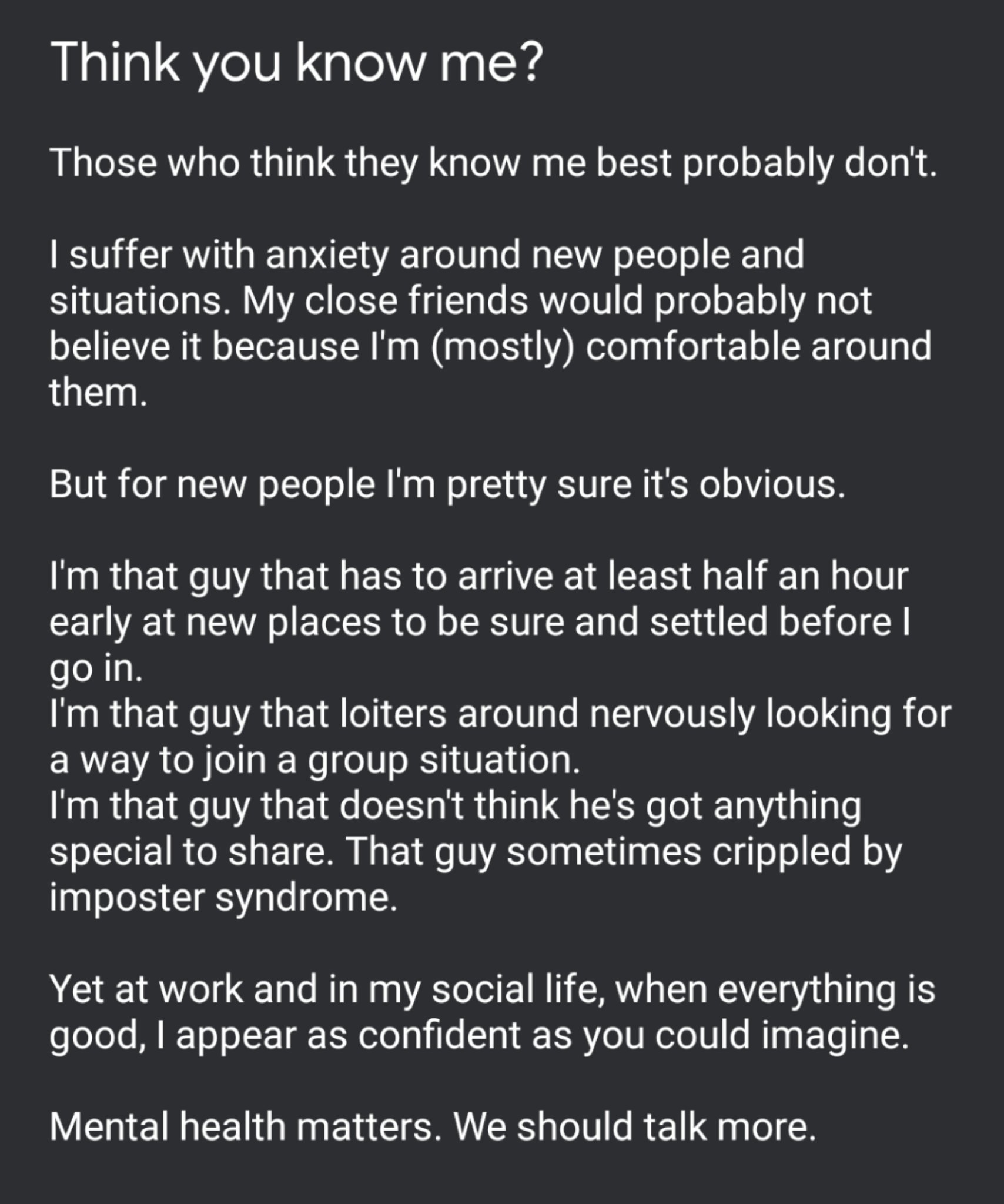
Think you know me? I've only recently got to know myself!

Image
tweeted Nov 11 @Rangathetrainer


Several days ago, possibly after following #SWE19 and the fun, games, innovations and emotions being shared by those taking part, I felt compelled to share the tweet on the right here.

I'm not normally one to share, I'm quite a closed book and have long upheld the typically british stiff upper lip approach to life: no matter how bad things are, turn up and soldier on with a smile. How often has that smile been painted on? I daren't even imagine!

It felt like a great relief to open up about my anxiety and I was touched by some very honest and appreciated conversations both in person and online with people I respect highly. 

I am that guy that get anxious about new situations. 
I take a while to warm up in new company.
I hover around nervously looking for a way in.
I am the guy that is constantly looking for reassurance. I want to feel like I belong.


It was this tweet from Miss C (@Tech_missc) that finally prompted me to open up: I need this space


As I wrote in my tweet, those closest to me probably don't see this side of me because with them, I am more at ease and usually sarcastic, quick-witted and sharp. But this is only because I feel I belong.

Throughout my professional life I have always strived to help others. I've never felt like I am brilliant or amazing, I just do what I think needs doing to the best of my ability. I find taking compliments very uncomfortable and tend to crack a joke to laugh it off or diminish my involvement to deflect the attention. 

It has only been in the last 2 years that I have begun to understand this. I made a bold decision 3 years ago and made a big career change. It was something I'd always felt I wanted to do. I was SO wrong! I quickly learnt that it wasn't what I wanted at all and I found my way back to a more suitable role as quickly as I could, as much for the benefit of others and for my own sanity and health. I was in the wrong position for me. It wasn't right or fair on me or others.

Walking away felt like a failure and it still haunts me from time to time, even though I try to remind myself that it was an equally bold decision to do so. I took a risk, it didn't work so I made changes and as a result, I've learnt a lot.

_________________________________________________________________________________

Part of my 'recovery' from this failure was down to a guy who I owe a huge amount. His name? Dean Stokes. (@deanstokes). 
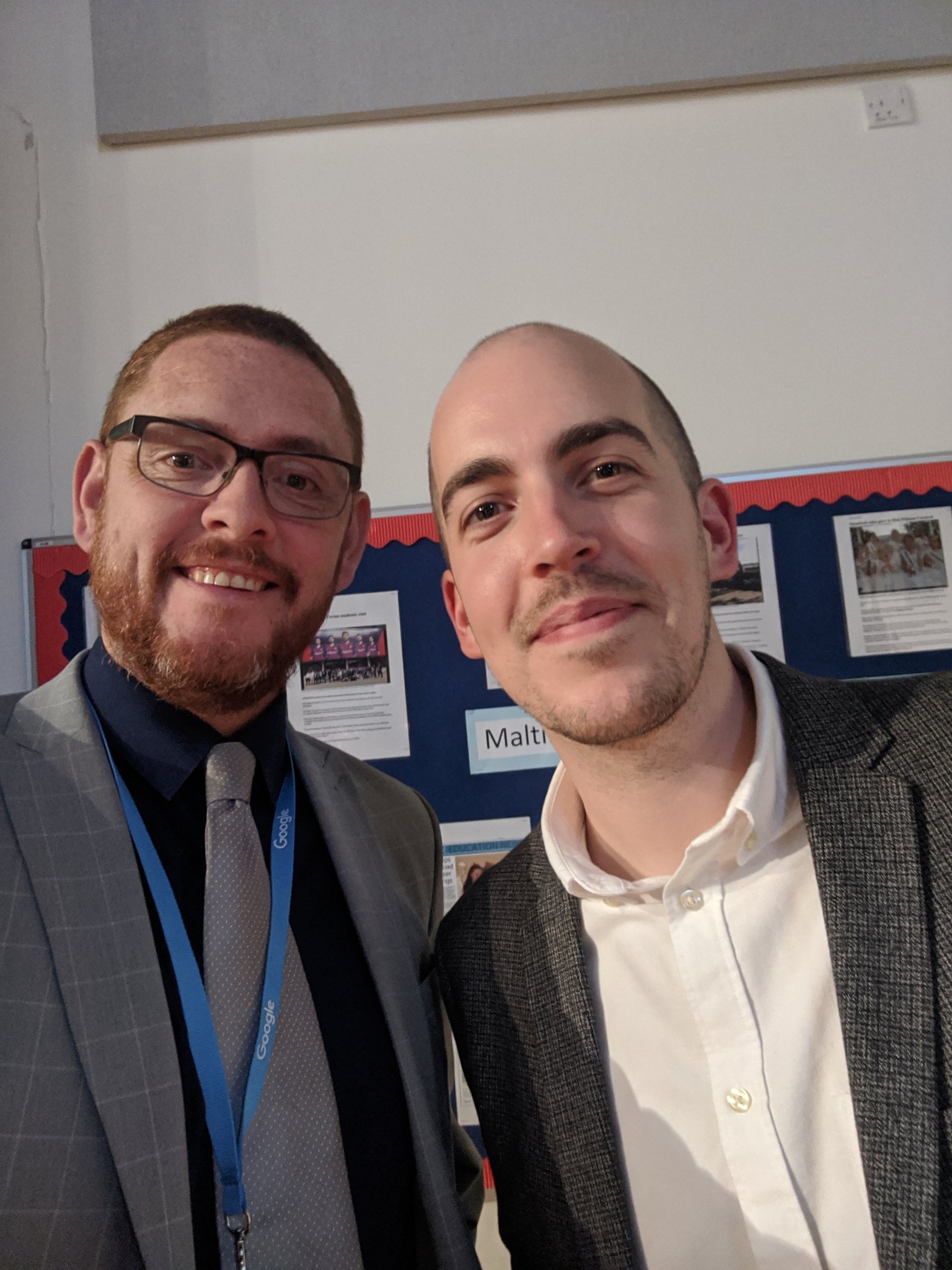
ImageI've known Dean for 20 years now, ever since he was a pupil in my very first Year 7 class in my NQT year. By his own admission, Dean was a shy young man in those days and somehow, he ended up growing in confidence and starring in school productions. He later returned to the school as a member of staff, a bit of a gamble of his own, and was instrumental in introducing G Suite to our school.

I had the honour of sharing an office with Dean for some time and learnt a huge amount about not just G Suite, but also, how to diversify and put yourself out there. When Dean moved on from school to full-time work, first with Appsevents, guess who took up the G Suite mantle.

I didn't feel ready. I didn't feel I had the knowledge base that Dean had. I felt I was dabbling and would quickly be found out. The one thing I was sure of though, I couldn't break it!

So fast forward to September 2018 and I got a call from Dean asking me to deliver a G Suite Support Staff Bootcamp for Appsevents in Aberdeen. I was hugely flattered but at the same time wondering, how desperate are you, Dean? You're asking me! 

I felt out of my depth and worried/anxious that I wouldn't be up to it. Getting a plane to Scotland was my first ever internal flight. I didn't even know what I needed but knowing Dean would be there to meet me at the airport got me through. At the hotel we met up with Ben Rouse (@Mr_BRouse) and talked about the plans for the next day. Then it was early to bed ahead of a busy day. I didn't really sleep. I kept tweaking my slides and pacing. Restless legs kept me awake.

The next morning we found our way to the venue and I had a great time with the staff there, who were welcoming and very receptive. I really enjoyed it but I still had doubts: Was it ok? Did they get what they needed from it? Did I miss anything? All these questions flying around my head.

Not long after Ben asked me to lead a similar bootcamp in Vienna. That was huge for me. And, as you might predict, I got to the school early, too early, no-one was there so I walked around Vienna for over an hour making sure I didn't stray too far and would be there on the dot to meet my contact. This was another great day and finished off with one of the delegates Jeremy, taking me to the Christmas Markets for some Gluhwein. A lovely way to end the day.

But all through this and still to this day, I don't feel like an expert, even though colleagues try to tell me I am. I just don't see what I do as anything special, because it's just what I've learnt to do.

So how does this all link?

Last night our school held our annual Key Stage 4 Awards Evening and I had invited Dean to be our guest speaker. We had several long chats beforehand and I was amazed to find he often feels like I do.
We talked about the message he could share and how that would be relevant to the students. He couldn't see it. That got us talking about Imposter Syndrome (which ended up a key part of Dean's message on the night). 

Needless to say, Dean smashed his speech. Everyone loved it. My technical side went well and the evening was a great success. A superb final school memory for our students and a great message for the future.


  • You’re more likely to regret the things you didn’t do rather than the things you did.
  • Take risks, make mistakes and learn from everything you do.
and remember
  • If you're feeling like a fraud, that's probably because you are really challenging yourself.
So to everyone reading this, thank you. Thank you for reading, thank you for reaching out, thank you for sharing - not just with me but with fellow professionals, friends and family.

And above all, thanks to you Dean. I would not be doing what I do now if it weren't for that quiet, shy guy who sat in French and allowed me to call him "Wally". 

The best kind of friendship is one where both of you grow as a result of the other.

Friday, 1 November 2019

G Gems 35: Extend yourself!

1. Voice typing in Google Sheets IS POSSIBLE with the Voice in Voice Typing extension from the Marketplace.  Just install the extension and double click in any cell to record the entry.

It's very accurate! Here's a demo video >>>


2. Have you tried Grammarly's tone detector yet? I've been using this for about 3 weeks now and it's proving quite entertaining as it tries to guide me to write appropriately worded content whilst correcting spelling and grammar.

I've enjoyed challenging it to see how accurate it is, and obviously, as a beta, it's still learning but it's been quite helpful beyond the novelty value on more than one occasion already. 

Grammarly guides you on the wording and tone of an email
as well as checking your spelling and grandma πŸ˜‰
3. Check my links is a useful extension. It shows you which links are working properly and which ones are no longer valid for any pages or documents that you visit. Super handy for documents containing links to 3rd party sites, other documents or resources.


Activate the extension and it highlights links using the scale above.

Add Check my links here

Sunday, 13 October 2019

G Gems 34: user accountability & tracking in G Suite

Google for Education's G Suite offers a wealth of tools for tracking purposes.

Whether that be tracking user access and trends, collaborators' input, document updates or as an audit trail for email conversations.

Here's a summary of some of the tools I and my colleagues use regularly both in the classroom and in the office.

Activity Dashboard
The activity dashboard for Google documents, available by clicking the sparkling icon (top right) 


gives document owners full access to see who has viewed the document, who has been shared the document as well as a trend timeline of when it was accessed.
This proves very useful when sharing documents with a number of users to contribute and update as you can easily see who has been working on the document and who hasn't at a glance.


Version history
This feature is often overlooked by new users to G Suite. You can access via the file menu or by clicking the hyperlink at the top centre of the toolbar that usually reads something like "all changes saved to drive" or "last edit made X minutes ago by ......"
The side bar will open up giving you the various autosaved versions of the document from its very beginning, including which users have made changes (using a handy colour code).

All versions can be renamed (I often rename version 1 "original") and also copied at any time.
Any previous version can also be restored with a single click if changes are rejected.


Cell history
This great new feature works like version history but for each specific cell within Google Sheets.
Using this feature you can exactly which user has updated a cell and the timestamp. Where a cell has been edited multiple times a full history is visible by edit, user and timestamp.


Comment history
Within Google docs, once a comment has been resolved, it flies away. However, click on the comment icon (top right) and the full comment history can be brought back at any time.
Perfect for demonstrating an ongoing dialogue on the progress or changes within any document.


Gmail delegated access - allows access to send on behalf of a service account/team account within your domain (but shows who you're dealing with)
To set up delegated access for another user, from the main account go to settings > accounts and invite specific users.


Those users will then get an alert asking them to verify their account. It can take about 30 minutes for the change to take effect but soon they'll be able to select the delegated account in the drop down.


------
If delegated access to Gmail accounts isn't for you or your organisation you could consider setting up a Google Group as a collaborative inbox.


Collaborative inboxes allow members of the google group to send and share across the group with all messages arriving via Gmail ( I use the forum option in my Gmail settings).


Wednesday, 13 March 2019

G Gems 32: If you're Appy and you know it...

If like so many people,  you'd love to be able to set up your own app but don't have a clue where to start Glide might be right up your street.

Glide works with google sheets to help you create FREE apps within minutes.

This could be used for all manner of purposes including:


  • PE Club Timetables
  • Revision Session Timetables
  • Holiday/Weekend Session Timetables
  • Subject Apps with links to key resources
  • Directories
  • List of students and staff for trips
  • many more uses
Here's a very basic screenshot of the sheet I used to test this out.  
I've included the type of social media platform and the link to them in separate columns. This is the result.


Pretty simple to do.


Here is how it appears in the app - I chose the dark mode setting but light is also available.


Click here to go to the live app


In your dashboard it's really easy to control and you can update your google sheet via the dashboard or in sheets itself.


Why not give it a try? You can be up and running in minutes!

Monday, 4 March 2019

G Gems 31: Just a quickie

It's been quite a while since I've had time to sit down and write a blog. There's been a lot going on in my real world of work and family so it's been hard to take the time to do anything lengthier than a quick twitter or Facebook post.

GMAIL updated

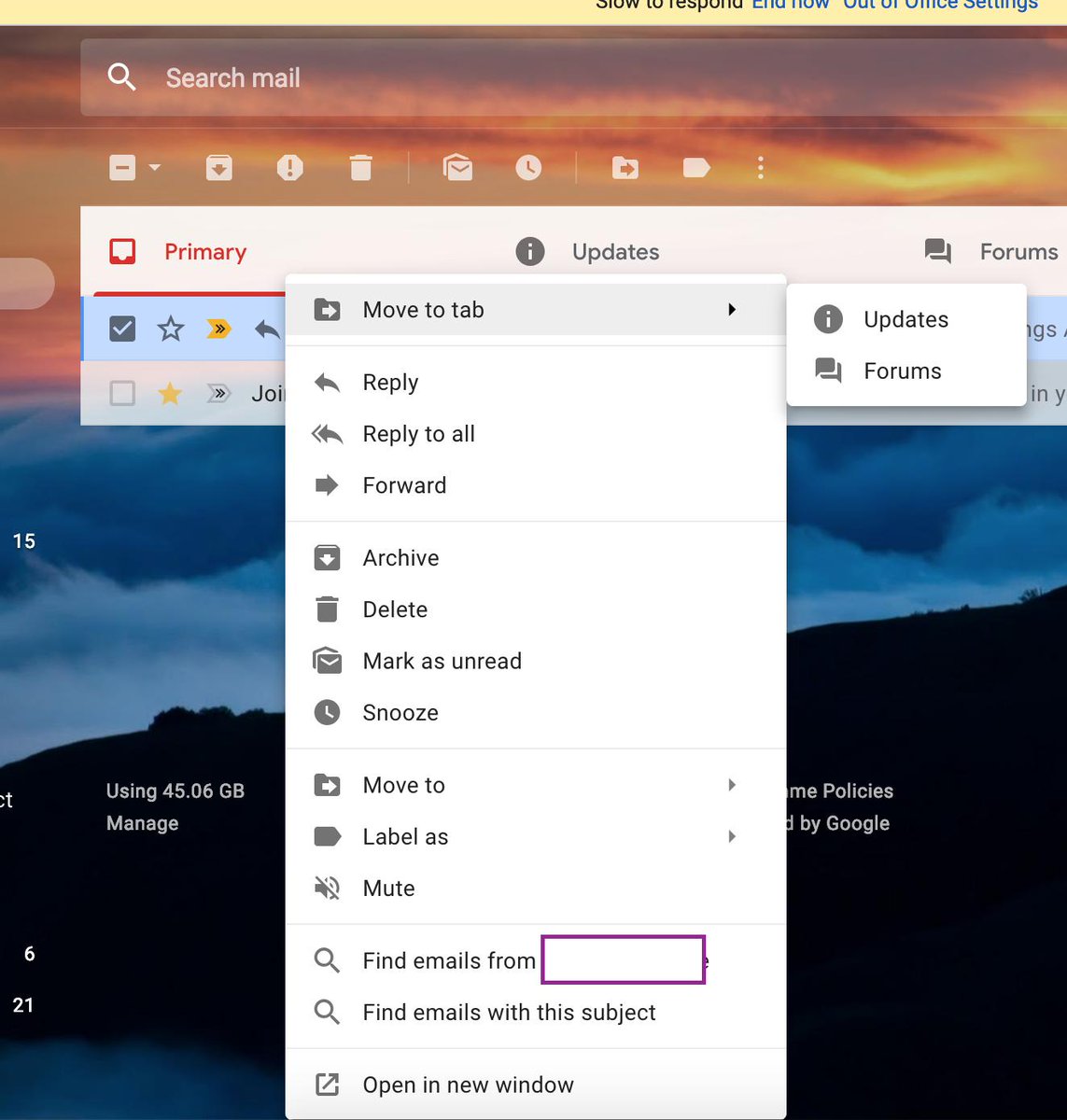
ImageOverall I'm liking the new update to gmail app but the very white interface has certainly divided opinions. One thing I really like now is the right click option on an email that allows you to use the "find emails from" and "find emails with this subject" feature.


This has already proved very useful and has sped up my workflow.


Embed videos into Google Drawings

If you want to embed videos into Google Drawings, here's how to do that in this much under utilised tool by using google slides first.


Google Sheets for Education Support Staff
As I work very closely with a team of educational support staff, I'm always on the lookout for ways to make their lives easier in G Suite.  I've put together a Youtube playlist of google sheet videos and gifs that my team have found useful which you can view here: Google Sheets Playlist

The list includes topics like using sparklines, combining data from 2 cells into 1, conditional formatting based on contents of other cells and more...

If you or your school is interested in some bootcamp style training specific for Educational Support Staff, why not contact @Appsevents1 and see what can be arranged? 

If you are a member of Educational Support Staff, join my Facebook group too or follow the hashtag #googleESS for updates, tips and tricks. 

Thanks for reading, stay tuned for more.


Sunday, 2 December 2018

G Gems 30: It's beginning to look a lot like Christmas...


It's beginning to look a lot like Christmas...

πŸŽ„πŸŽ„πŸŽ„πŸŽ„πŸŽ„πŸŽ„πŸŽ„πŸŽ„πŸŽ„πŸŽ„πŸŽ„

It's December 2nd and this is the first chance I've had since half-term to sit a write anything on here.  The Autumn term, as always, is a long and busy one but Christmas is homing into view and it won't be long until the days start getting longer again!

I'm very fortunate to have just returned from Vienna, having led a Support Staff Bootcamp and the Vienna International School for @Appsevents.  It was my first time in Austria for 30 years and what a beautiful city Vienna is: clean, friendly and calm. Although I flew in late on the Thursday night and flew out again late Friday night, after a very intensive full day of training with the excellent staff at the International school, it was great to be able to fit an an hour or two at the Weihnachtsmarkt in Marksplatz. One 
of the school staff, Jeremy, offered to show me around and I was able to take in some sights, buy a couple of hand crafted gifts for the family and enjoy a warming mug of GlΓΌhwein in the fresh Vienna air (-4 degrees having left London at 13 degrees). 


I really enjoy the Support Staff Bootcamps for 2 reasons: The first is that I can guarantee within any group (this week there were 19) there will be a range of ability within G Suite but that everyone is a mini-expert at something.  It may be one tiny aspect of one of the G Suite products, but from tiny acorns..... The second reason is that quite often, schools adopt G Suite for Teaching and Learning purposes and the support staff kind of have it thrust upon them. This can be daunting and occasionally resented...but once we dive into what G Suite can do, everyone comes away with some positives and beginning to think about the possibilities. 

So I'd like to thank all the staff at Vienna International School for their positivity and hospitality during my visit. Well done to the 24 teaching staff who gained their Level 1 educator certification with @BogdanCopil who ran their 2 day bootcamp alongside and thanks again to @Appsevents for the opportunity and my schools for allowing me the time. 


Here are just a few tips and tricks you might like to try:

1.  Housing documents in multiple team drives

One of my favourite aspects of Drive is the ability to use the SHIFT + Z trick to add documents to multiple folders, meaning 1 version exists in many places but everyone has access to the same live version, no copies. 
Due to the nature of Team Drives, this isn't an obvious option, in fact, many think it's not possible - but it is! 


2. Qlearly - organise your tab windows for different purposes

This new kid on the block is a handy way to organise your tabs for different purposes - it comes with a template of ideas which you can edit as you see fit.  Have a board set up with sections for each class, or each role and save the commonly used sites for that purpose in each to open quickly and easily at the touch of a single button. 


3. Mac users - upgrade to Mojave

The latest version of ios for macs allows screen recording and screen shooting with annotation as standard using CMD + SHIFT + 5


And finally

My students current favourite thing in feedback...

Using Google Keep to provide animated GIF feedback in slides and docs.

Save your favourite GIFS to keep and in slides or docs, just pull those gifs into the docs to give students engaging feedback.
I've noticed increased improvement rates in student work as they're keen to see what the next GIF will be.


Saturday, 22 September 2018

G Gems 28: What a difference a year makes! Let's head to Bootcamp.

So just a year ago I attended the Google for Education Back to School Summit in London which was being hosted by my good friend and former colleague/student Dean Stokes for Appsevents. This was my first visit to Google and quite an eye opener as we played around with Jamboards and sat on inflatable pink flamingos for a coffee and a chat. It was a very inspiring day and prompted me to get more involved. 

Within a month, a October half-term 2017 I set aside a day to complete my Certified Educator Level 1 exam and passed, so did Level 2 the following day. I passed again and was feeling really pleased with myself. 
Fast forward to January and I was asked to lead some Google training, not for teaching staff but for Educational Support Staff in my schools. As the unsung heroes and the glue that keeps schools together, I wanted to make sure I got the right notes and the team came away with something to actually use in their every day work lives. The feedback was positive: Mission Accomplished. 

In July I was asked to run some CPD for a local primary school with teachers and but for a few WiFi issues, that went well too. At the same time I was constantly chatting withy wife, who is a Finance Assistant in a secondary school, about her workload and balance. I've tried to get her using more G Suite but it's a but to be fair, when she gets home she wants to relax, not launch into training mode, even though we both know I can help: Work in progress.

At the end of July 2018 I completed my Certified Trainer application and was successful so set about planning my 12 sessions for the year. With day 1 of the Autumn term in the calendar already for LSAs I devised and ran a short digital escape room designed to raise their awareness of Google Forms and Classroom. That went well too so I offered to run a term long in house CPD pathway on G Suite for staff which begins next week. It begins next week as the original date has to be postponed following a text from Dean Stokes asking if I could make it to Scotland this weekend to help out with an Appsevents bootcamp for Support Staff. I got the nod from my bosses and booked my flights and hotel.
My first day delivering a bootcamp - Robert Gordon's College, Aberdeen

Yesterday was that day as I delivered my first full day Support Staff Bootcamp at Robert Gordon's College in Aberdeen. What an amazing building to work in on my first visit north of the border!
After a hearty breakfast in the hotel, including haggis and tattie scones, Dean, Ben Rouse and I headed off to set up.

The group of 6 support staff I was working with were all in different roles and confessed to different levels of confidence and frustration but they were awesome and very positive throughout. (Always appreciated on your first one, so thanks folks!)

We had a packed day and it was awesome to see faces light up and "You mean, I can just do that...?" flying around the room.

As I explained to the group, my view is that support staff in schools using G Suite often get the tools thrust upon them because it's been brought in for teaching and learning. Often they are self taught and know what they know, which can be limited so it was great to dive deeper into Drive, Docs, Sheets, Forms, Slide, Sites and more with them. When the day finished everyone was really appreciative and full of ideas so I'm happy.

This massive part of the educational work force is often massively under appreciated and that's why I've created a Facebook group for Support Staff using G Suite.

If you have support staff in your school that would like to see hints, tips and share best practice, please invite them to join.

Also look out for #googleESS on social media 


Sharing is important but more importantly in this day and age, G Suite can change your world.
As I said to Ben and some of the group afterwards, I'm not selling anything except a better work-life balance. What's not to like? 

Thanks to Dean, Ben, Appsevents, everyone who took part in the day and also my schools for allowing me the time!